[In depth] The secrets of web optimisation
![[In depth] The secrets of web optimisation](/blog/media/aircraft-vehicle-drive-fire-speed-rocket-1252989-pxhere.com_-1024x685.webp)
The speed of a website has a direct impact on user comfort. We know that a slow website significantly reduces the time visitors spend on it, and it is also thought to affect search engine rankings. Optimising your site's speed is therefore a key factor that you really should not overlook.
What causes slowness
Contrary to popular belief, a slow website is not always caused by a slow server. Of course, an overloaded or poor-quality server can make a site sluggish, but HaiSoft does everything it can to rule out that possibility.
We go to great lengths to ensure that your hosting is always fast and available: all HaiSoft shared hosting servers, as well as all new servers, run on SSDs for maximum and consistent performance. In addition, our servers are actively monitored, so any heavy load is identified immediately and the issue resolved very quickly. HaiSoft hosting is therefore an excellent way to enjoy exceptionally good performance in all circumstances. See in particular:
In this context, we find that the vast majority of support requests about slow websites are due to a lack of optimisation of the sites themselves – hence this article.
What is optimisation?
The time it takes to display a website depends on two main factors:
- The CPU resources (processor) used on the server, generally by PHP scripts and the MySQL database while the site's pages are loading.
- The resources sent by the server to the site's visitors, i.e. media, images, scripts, etc.
Optimisation therefore means working on both of these factors: on the one hand, generating pages quickly on the server side, and on the other, making sure users receive those pages quickly, whatever the speed of their internet connection.
Do you find this blog fast? It is currently hosted on a HaiSoft shared hosting server, and we have applied the optimisations recommended in this article to it.
1) Optimising server resources
Note: we will mainly be talking about optimising CMSs here, although some of the advice applies to every situation. In this article we will not take a developer's point of view – developers should already know what optimised code looks like.

The time it takes to load a page on your site is directly linked to the computing power needed to generate it. It is therefore important to make sure that the PHP code generating your pages is as optimised as possible, so that loading times remain reasonable.
Moreover, in some extreme cases, a poorly optimised (or completely unoptimised) site can slow down an entire server. If, for example, every page triggers very long MySQL queries (more than 20 seconds) and the site receives several visits per second, the server's CPU usage can quickly hit 100% and performance will degrade dramatically – the server may even stop responding if the usage limits set on its various services are too high. This is precisely where certain limits on the MySQL and Apache servers come into play: they are designed to keep the server accessible by preventing it from becoming completely saturated.
It is also important to understand that PHP only uses a single processor core per process (and therefore per page loaded). This means that your pages will not load any faster with 8 cores than with 2 if there is only one visitor (assuming other processes are not saturating the remaining resources); however, you will be able to handle more simultaneous visitors without any slowdown. MySQL's CPU usage must also be taken into account: if a query scans millions of rows, it will take several long seconds to run, which will load the server and slow down your site.
Mistakes and false leads to avoid
To save time, let's start with what to avoid.

- Leaving a site un-updated on an obsolete version of PHP: besides the serious security problem this causes, you could be reducing your site's performance by a factor of 1.5 to 3. As a reminder, the latest PHP versions are always available at HaiSoft and you can upgrade at any time (in French).
- Rushing to install caching plugins (WPSupercache, WPRocket…) at the slightest slowdown. If your site is very slow, you first need to tackle the problem at its source and work out where the slowness comes from, rather than going straight for a stopgap that is generally far less effective than genuine optimisation. So start optimising without a caching plugin and finish with this step, which should remain the final "icing on the cake". Not only can caching plugins not cache everything (some slow queries may remain), but they can also cause many problems during development – all the more reason to keep this step for the end.
Now let's look at the right ways to optimise your site.
Updates
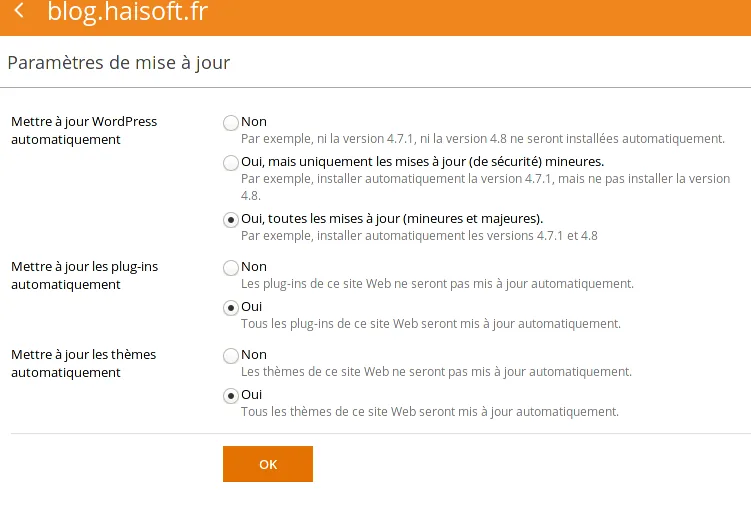
Make sure your CMS is up to date, along with all its themes, modules, extensions and so on.

In particular, take advantage of automatic updates for your WordPress site via your Plesk control panel, available with our WordPress plans.
PHP version

Make sure you are using the latest PHP version supported by your script and your hosting provider. At HaiSoft, your PHP version can be changed from your Plesk control panel (both links in French), and we support new PHP versions as soon as they are released. An up-to-date website will support the latest PHP versions, which are faster and more secure. We estimate that PHP 5.6 is twice as fast as PHP 5.3, and PHP 7.1 twice as fast as PHP 5.6 – so this is the place to start!

Plugins and extensions
They are the number one cause of slow websites, so you need to keep a very close eye on the modules installed on your site.

- Keep the number of installed plugins/extensions/modules to a minimum: each module is an additional source of slowdown. Regularly remove plugins that are unnecessary or obsolete.
- Check that none of your plugins or modules is too resource-hungry. To do so, deactivate all modules, check the site's speed, then reactivate them one by one to find the plugin(s) slowing the site down. For WordPress, the "Query Monitor" plugin will help you measure page loading times precisely and spot resource-intensive elements. Do the same with optimisation plugins – you may be surprised to see just how much some of them can slow your site down.
- The same applies to themes: make sure you use an optimised theme that does not slow your site down, and try out other themes for comparison.
Site "builders"
"Builders" are the modern trap, especially for WordPress. CMS builders (not to be confused with external builders, which generate static HTML code and therefore do not have this optimisation issue) promise to let you create a bespoke site quickly and efficiently.
The problem: builders consume huge amounts of MySQL and PHP resources.
They generate long-winded MySQL queries and page computations that slow the site down considerably. Each element is a shortcode that PHP must convert into fuller PHP code and then into HTML, which in some cases causes a dramatic loss of speed. I really must stress this, because we have measured a difference by a factor of 3 to 4 for most of the popular builders: a site that takes 0.3s to load with the default WordPress theme takes more than a second once the builder theme is selected. On a site that already takes 1s to load, your visitors end up waiting several seconds, not counting data transfer time. In some cases, this can be a real problem.
Builders can also cause many bugs and cannot easily be replaced – you have to rebuild the whole site, as the pages are not stored in WordPress's native format.
So think carefully before choosing a builder, and favour native themes, which are much simpler, more stable, more versatile and faster.
Your page content
Do you really need to load previews of 300 posts on your home page? To load post excerpts? To load the 100 latest comments in a widget? No server can display a CMS page like that quickly without caching, since page loading is limited to a single processor core per page.
On WordPress, we have seen a significant speed gain simply by disabling post excerpts on the home page. We therefore recommend choosing explicit titles and images and reducing post excerpts as much as possible (or even removing them), as that means fewer MySQL queries. We also advise against piling up unnecessary widgets. A simple site is sometimes more attractive to visitors – and it is certainly faster for the server to process.
Overall, the most important thing is to pay particular attention to optimising your most visited pages, especially the home page.
MySQL databases
How quickly your site's MySQL queries run has a direct impact on its speed. You can improve this even without any specific MySQL knowledge. However, we always recommend great caution when working on your database: export dumps and take backups before making any changes! This takes just a few clicks from the Plesk control panel provided by HaiSoft.

- Reduce the size of your database: the smaller the MySQL database, the better the performance.
- If your database contains connection logs or similar data, find a way to clean it regularly (via the back office, a plugin, or manually via PHPMyAdmin, for example).
- A CMS database (except in cases where there really is a lot of data, such as a news site) should not exceed 100MB at the very most.
- Check your comments, which may contain spam, and review the registration settings and comment approval policy on your site.
- For sites such as WordPress, consider deleting old post revisions and cleaning up "Transients" with a plugin.
- If you are on a dedicated server or VM, ask your HaiSoft managed services team whether more of your database can be held in RAM, if your server's capacity allows it; in some cases this can bring a performance gain.
2) Optimising client-side resources
Page size, the number of resources loaded, where they come from, image sizes and compression all play a part in how quickly a site loads.
Measuring optimisation with GTMetrix
We recommend reading our dedicated article to master this tool:
The https://gtmetrix.com/ website lets you analyse your site's performance in detail from your visitors' point of view.
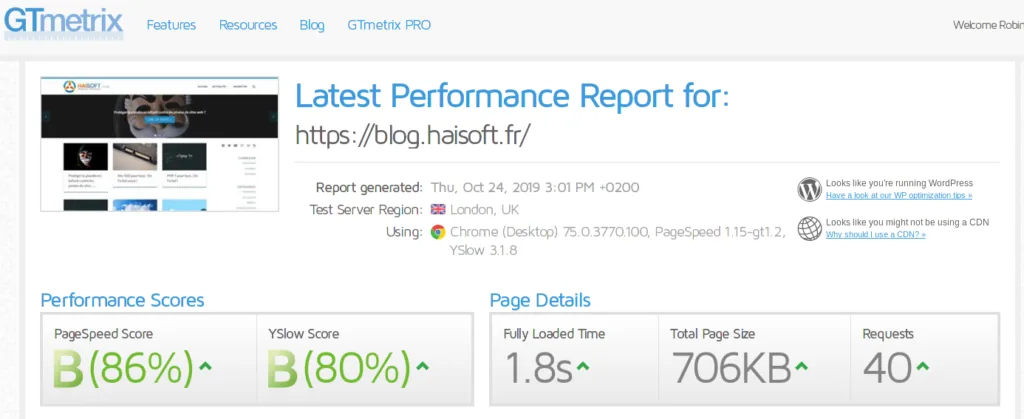
Before optimising any resources, we recommend running this test to get a clear idea of what needs work, and also to track the progress of your optimisations.
In this article we will go through some of the most common recommendations, but the list is not exhaustive and we encourage you to research further if needed.
Overall page size
Bear in mind that not everyone has a fast internet connection or a powerful device (mobile or otherwise) to view your site.
- Where possible, we recommend keeping your page to around 1MB at most, so that even a connection of just 2Mbit/s loads it in about 5 seconds.
- If your site is very "visual" and features large images, you could possibly go up to a page size of 2MB.
- For a photography site, there are no real rules any more, but ideally you should display compressed previews with the option to enlarge the images in good quality.
- If you embed videos, it is usually better to use an external platform (YouTube, Vimeo, etc.), which will be very good at offering different quality levels and compressing the video properly.
Number of external requests

These are requests made when someone visits your site to load resources that do not come from your site. External resources generally cost the visitor a lot in loading time.
They mainly come from themes and plugins that change your site's appearance, and mostly consist of fonts, JS scripts and CSS.
For every external site hosting one of these resources, the visitor has to make an additional DNS request. Each request takes a few milliseconds, which add up to a significant amount of time, at least for the first page load.
In addition, external servers may be located far from the visitor's country, increasing latency and reducing throughput.
You should therefore try to keep the number of external resources loaded to a minimum. GTMetrix lists them under "YSlow" and "Make fewer HTTP requests", as well as in the "Waterfall".
Ideally, you would load no external resources at all, but this is virtually impossible with a modern CMS. The threshold not to exceed is therefore 30 external resources as an absolute maximum, ideally with fewer than 10 external requests.
To achieve this, you sometimes need to choose other themes and plugins that store these resources locally.
Total number of requests

Each resource adds a little latency. If there are too many different resources, the site slows down, especially on connections with a high ping (latency).
This figure is shown at the top right of the GTMetrix test: "Requests".
We recommend trying to stay below 100 requests as an absolute maximum, ideally with fewer than 50.
Concatenating scripts is one way of reducing the number of script files sent, and therefore the number of requests. It is worth exploring, but it is not the only option: you need to choose efficient scripts that do not require too many files to work. This can be set up using caching scripts; caching plugins will then generally take care of concatenating and compressing scripts.
Scaling images
As far as possible, you should only load images at the final size at which they will be displayed.
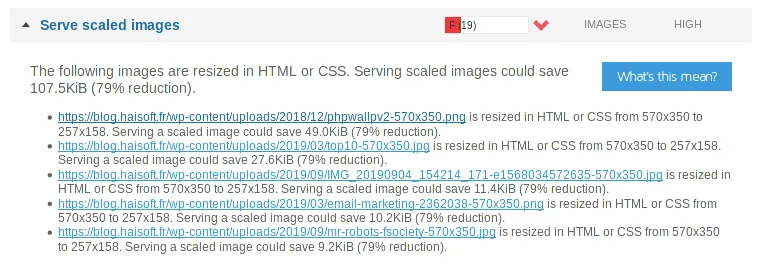
It goes without saying, for example, that using a high-resolution image as a post thumbnail is not ideal: why load an 8MB high-resolution image when a 128×128 image weighing a few kilobytes would probably have been enough?
Fortunately, most CMSs – including WordPress, which lagged behind on this for a long time – handle thumbnails and can generate images in different sizes, then use the right one depending on the context. You still need to make sure that your theme actually makes proper use of these thumbnails. If it does not, you will have to resize the images manually.
Some plugins offer to do this for you: I recommend backing up your files and database before doing so, as this operation can put the quality of your online images at risk.
In GTMetrix, this information can be found under "PageSpeed", in the "Serve scaled images" section.
On VMs and dedicated servers, the Google PageSpeed module, which can be integrated into Plesk, can help. It can convert the site's images on the fly to suit the screen size (provided the original images are not too large). Your support team can set this up; you will need to provide a Google API key for it to work.
Optimising image compression
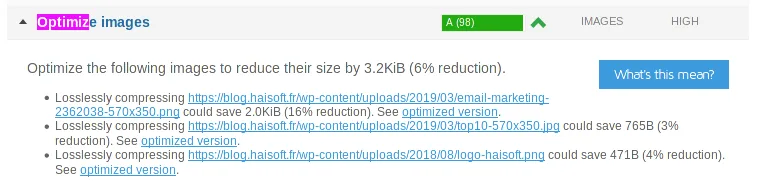
We recommend using a good image compression ratio as well as modern formats.
As with scaling, the "PageSpeed" module (VMs and dedicated servers only) can help here. Some plugins or scripts can also take care of it; in that case, we recommend backing up your site first, as compression can sometimes spoil your images.
Conclusion
These few tips cover the most common cases and should help you drastically improve the performance of your site and/or server, enhance the user experience and so maximise visitor retention. This is only the beginning: there are thousands of other ways to optimise a site, each specific to its context. That is why we advise you not to stop at this introduction but to take your research further, especially for high-traffic sites, where optimisation can make all the difference.
Need more power?
Still not happy with your site's performance after following this guide?
- Not a HaiSoft customer yet? Contact our sales team via our website
- HaiSoft customers: contact HaiSoft support by ticket or by phone to find a solution