PHP 7.4 and 8.0 now available!
Update your hosting now!
A quick reminder about PHP
PHP is the interpreted language used by most modern websites. It is a truly living language that all its users need to keep a close eye on.
Why updating matters
PHP is constantly improving, with ever more features, better performance and, above all, stronger security.
Nobody wants a slow or hacked website. To avoid this and benefit from PHP's continuous improvements, you need to update your sites' scripts (WordPress, Joomla and others) regularly and select the available and compatible PHP versions for your sites (in French) in your hosting settings.
The more regularly you update your scripts, the more smoothly the updates will go: so do not wait, you have everything to gain!
Finding it hard to keep your WordPress site up to date? Discover our unique, personalised WordPress support!
The end is near for PHP 7.3
PHP 7.3 is already at end of life. Its security support is due to end on 6 December 2021!
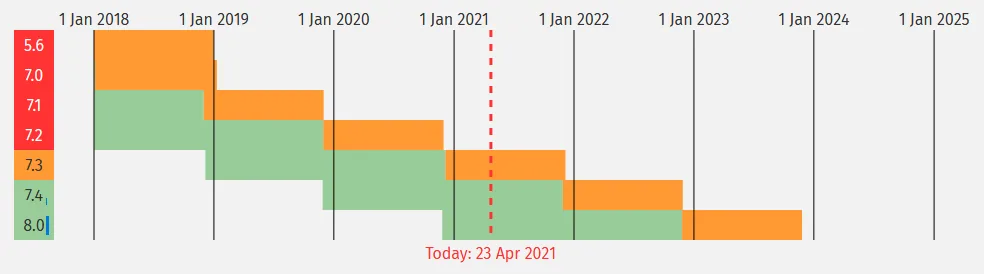
By then, you will need to have updated your sites and, in some cases, your servers.
How do I get PHP 7.4 and 8.0?
Dedicated or virtual server
Your HaiSoft managed services team can make these versions available on any virtual or dedicated server running CentOS 7 or later that has been upgraded to Plesk Obsidian (18.0.34) or later.
If your dedicated or virtual server runs CentOS 6, it is time to consider migrating to an up-to-date CentOS 7 server: CentOS 6 support has ended and it will no longer receive the latest PHP versions.
Contact HaiSoft technical support now to schedule your server upgrade.
Shared hosting
Are you on one of our new plans? Good news! Your server already supports these PHP versions!
Is your plan older? Since 29 April, PHP 7.4 and 8.0 have also been available on all compatible servers. Only servers srv02, srv15 and srv16 (and the “legacy” srv23 and srv24) are incompatible. If you are on one of these servers, you can switch plan and server simply by opening a ticket with our sales team.
Choosing my PHP version
In your Plesk control panel (in French), under the relevant domain, click “PHP Settings”:
In the “PHP support” drop-down menu, select the version you want.

At the very bottom of the page, click OK.

Wait 10 to 15 seconds, then try visiting your site. Check that it works properly using the logs available in Plesk (in French).
No errors? Congratulations, your site is now officially running an up-to-date PHP version!

PHP 8.0: what is new and compatibility
According to the PHP project, the main improvements concern performance, syntax and security.
Developers, feel free to read the dedicated PHP page.
This version is aimed first and foremost at users of popular CMSs such as WordPress or Joomla who keep their scripts up to date.
WordPress, often the quickest off the mark, is already compatible with PHP 8.0! If your site is fully up to date and its themes and plugins are properly maintained, go ahead and give it a try.
Joomla should also be compatible following patch 3.9.23 (in French) and the subsequent ones up to 3.9.26.
For less widespread CMSs, please check the official documentation provided by their publishers.