The 7 cardinal security mistakes in webmastering
As a hosting provider, we regularly see websites being hacked, which is never pleasant for their owners. These attacks exploit unpatched vulnerabilities and easy entry points that hackers and malicious bots love. We estimate that at least 95% of hacks could have been prevented by simple measures taken by the webmaster. That is why some sites get hacked and others do not.
Here are the main mistakes you absolutely must avoid if you do not want to see your site hacked.
Mistake 1) Using an “easy to remember” username and password
… And easy for hackers to guess!
If your username is “admin” and your password is “password”, you might as well put “hack me” as the title of your site: it is like leaving your front door wide open when you go on holiday.
You would be surprised how many hacked sites had the user’s first name as their password… Neither a bot nor a human should be able to guess your username and password.
Do not overlook the username either: if it is also hard to find, it adds an extra layer of security to your login. The username “HackMeIfYouCan_42-1337” is far harder to guess than “admin” or “administrator”.
Your passwords protect access to your services. Whether it is FTP, your back office, your customer area, Plesk or your mailbox, you want to be the only person who can get in. Countless bots and malicious users trawl the web looking for weak passwords so they can use your accounts to send spam, push advertising or simply cause harm. That is why it is essential to choose secure passwords – “good passwords”.
A good password must:
- Be at least 8 characters long
- Contain lower-case and upper-case letters, numbers and symbols
- Be unique
A password must not:
- Contain words found in the dictionary
- Contain any word related to the account it is used for
- Contain an obvious sequence (qwerty, 123, 2017, etc.)
Mistake 2) Ignoring your site’s updates
Is your CMS used by millions, or even billions, of websites?
Are you running dozens of add-on modules which are, of course, just as popular?
Update them! As often as possible!
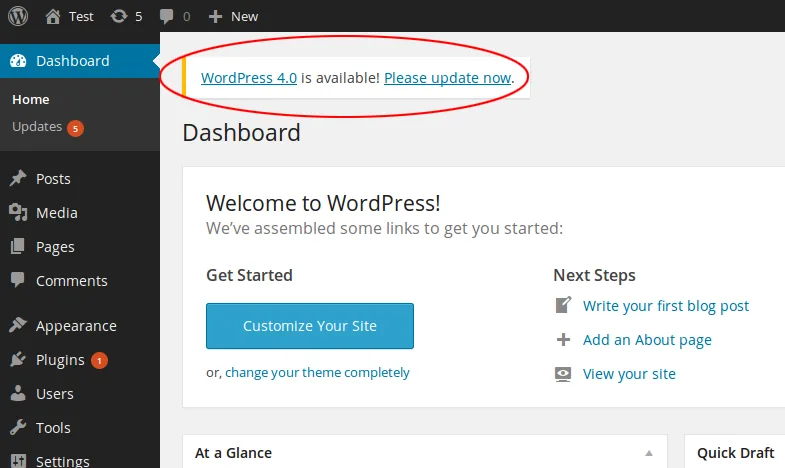
Because these CMSs, themes and plugins are popular and widespread, they are the prime target for hackers.
But they are also very well maintained by their developers: as soon as a security flaw is discovered, it is fixed very quickly. You therefore need to update promptly to close the vulnerability.
If your site is not up to date, you are the one who will get hacked!
The longer you go without updating your site, the more your chances of being hacked increase… exponentially.
We recommend updating at least once a month, and we consider the risk of being hacked to be very high after three months without updates.
Likewise, if you notice that a plugin or theme is no longer maintained by its developer, find an alternative.
Updating a modern CMS usually takes just a few minutes and a few clicks, and update-related problems are all the rarer when you maintain your site regularly – it would be a shame to miss out.
At HaiSoft, all hosting plans run on Plesk (in French), which detects many CMSs. You can enable automatic updates, update the plugins and themes of several sites at once and even check and improve the security of your CMSs. We strongly recommend making full use of these features! Feel free to ask our support team for advice if needed.
Mistake 3) Using an outdated version of PHP
PHP is the language behind every modern dynamic website. “PHP” refers both to a programming language and to the interpreter that runs the code. It is constantly evolving to improve loading times and, above all, security. With each new version, PHP fixes vulnerabilities, disables functions deemed dangerous, and so on. So you need to keep your PHP version up to date.
Would you fly to the other side of the world on board this aeroplane?

And yet we regularly see customers install state-of-the-art CMSs such as WordPress on a PHP version that has been obsolete for years (such as PHP 5.4). Not only can this cause malfunctions and slow your site down considerably, but above all it leaves huge security holes wide open.
At HaiSoft, new PHP versions are available to you on the very day they are released!
For the best possible experience and security, take a few seconds to log in to your Plesk control panel and choose the most recent PHP version compatible with your script (in French).
Mistake 4) Thinking you are invulnerable
Creating a website and publishing content has become so easy that we almost forget the public nature of the internet is also a risk.
If your site is static (HTML), the only possible risk is an overly simple FTP password. But if, like most sites, yours runs on PHP – meaning it executes code and accepts commands from the outside – you can easily see that a few precautions are needed.
– “Who would want to hack us? We’re just a tiny association.”
– “I thought WordPress was secure.”
– “I didn’t know I had to install updates.”
– “Who could possibly guess my dog’s name as a password?”
These are all innocent remarks we often hear after a hack, yet they reveal a complete misunderstanding of the real risks.
We live in an age where hackers program bots to search for vulnerable sites and hack them automatically.
For our part, we make life hard for these bots by banning them from our servers whenever their activity is recognisable, but we cannot detect all of them, and if your site is truly vulnerable they may achieve their aims before we spot the intrusion attempt.
Hackers’ motives are often financial (sending advertising, mining cryptocurrencies, harvesting e-mail addresses and selling them to unscrupulous advertisers); sometimes it is a contest between hackers (who can get their name onto the most sites); and only very rarely is it a targeted attack aimed at harming your business or you personally.
These risks therefore apply to every website online.
Whether your organisation is tiny or huge, whether or not you use a popular CMS, any dynamic site may contain security flaws.
On the internet, you are on an equal footing with everyone else: just as vulnerable.
- Never neglect a security measure on the grounds that it does not apply to you.
- If your site can be hacked, it is only a matter of time before it is.
- When it comes to security, better paranoid than careless.
- Your overall security is only as strong as the weakest link in your chain.
Mistake 5) A bug? Easy, I’ll just raise the permissions! chmod 777 (rwxrwxrwx)

If you ever feel that running “chmod 777” is the solution to a problem, you are almost certainly making a mistake.
Here are a few reasons never to do it:
- Giving every user on a server full rights to your files puts your site at risk.
- Execute permission should never be granted on PHP files.
- There is no reason for every user on the server to have rights over your site’s files.
Here are the best practices to follow:
- A modern web server is designed so that “644” permissions on files and “755” on folders are sufficient. On the Plesk hosting plans provided by HaiSoft, files therefore belong to your main FTP user (the site user) and to the “psacln” group (Plesk).
- The “httpdocs” folder at the root of your site must be set to chmod “750” and belong to the “psaserv” group.
If a file or folder cannot be read or written, first ask yourself why. Do the files belong to the right user? Is access restricted at the level of a parent folder or by an .htaccess rule? Check your logs first! (in French)
In short, minimum permissions mean maximum security. Keep it in mind! If in doubt, ask HaiSoft support – we will be happy to advise you.
Mistake 6) Not making backups / keeping backups locally
What would happen if your site were hacked, or if you lost everything through a mishandling error? There is no such thing as zero risk! Whatever happens, keep a backup of your site in working order.
Perhaps you are thinking of installing a backup module on your site? That is rather like keeping your spare car key inside your car… In other words, it is the worst backup possible – do not do it. What is more, such a backup fills up your hosting plan and will be useless if your data is deleted by accident or by a hacker. There are far better alternatives.
Remember rule No. 1 of a good backup: a backup worthy of the name must be stored away from the source it protects.
Here is the most basic, universal and effective way to make a full backup of your site. It takes less than 10 minutes and can be a lifesaver:
- Create a backup folder named after the site and today’s date on your computer, NAS or external storage device (avoid USB sticks, which are among the least reliable media). For example backup_mysite.com_01April2022.
- Log in to your Plesk control panel.
- Export and download a dump of your database from the control panel, and place it in your backup folder.
- Connect via FTP (in French) and download all the site’s files, placing them in your backup folder as well.
- Optionally, create a properly named .zip of this folder to make sure its contents stay unchanged.
If you have an FTP server, you can schedule an automatic backup to it in Plesk. Feel free to contact us if you need help setting this up.
HaiSoft makes daily backups of its shared hosting servers and keeps them for 4 to 12 months. However, customers sometimes discover they have been hacked, or respond to our warnings, more than 12 months later. Restoring from our backups is then impossible, and repairing the site (in French) can be complex, or even impossible in some cases. So keep at least one archive – ideally several – of your site in perfect working order. This backup may also come in handy if an update fails or you make a mistake.
A backup should be made before and after every major change to your site, so that you do not lose your work and can roll back in case of error – but above all, so that you have something to restore if your site is hacked or you make a mistake.
Mistake 7) Not using HTTPS

Securing your site with Let’s Encrypt is 100% free at HaiSoft and very easy to deploy in most cases.
Don’t wait a second longer!
Protect your login details and personal data. HTTPS has become an essential security standard. It protects against certain “man-in-the-middle” attacks, but also against some bot attacks, as some hacking bots are still not HTTPS-compatible! It also improves your search engine ranking (SEO).
HTTPS is a subject in its own right, and we have an article that explains it in detail: Secure your site with HTTPS using SSL/TLS by Let’s Encrypt: it’s free at HaiSoft!
We hope you enjoyed this article and that you will avoid these mistakes. If you found it useful, please share it!