PHP 8.1 is out: what you need to know
As every year, a new version of PHP arrives and an old one is retired. PHP is the programming language that powers the vast majority of websites. Which versions are recommended and compatible? How long can older versions still be used? How do you make the switch? Details and information.
PHP 8.1 availability at HaiSoft
From today, PHP 8.1 is available across HaiSoft's entire fleet of shared hosting servers.
You can select it in the domain's PHP settings in your Plesk control panel (in French).
For virtual and dedicated servers, your server must meet two prerequisites:
- Run CentOS 7 or later
- Have the latest Plesk Obsidian update installed
Feel free to ask the HaiSoft managed services team to update your server by opening a ticket from your customer area.
PHP 8.1: new features and compatibility
This version once again improves PHP's execution performance and adds new features.
As PHP 8.1 does not involve any major overhaul of functions, we expect most scripts compatible with PHP 8.0 to remain compatible with this new version.
According to our tests, the latest version of WordPress is already compatible with PHP 8.1. However, keep an eye on the compatibility of themes and plugins that are no longer maintained by their developers. If you run into problems, you can always switch back to an earlier PHP version, deactivate the problematic plugin or change theme.
Note that we have seen errors under PHP 8 when installing via the WordPress Toolkit built into Plesk. Until a fix is released, we therefore recommend installing under PHP 7.4 and then switching to PHP 8.0 or 8.1.
As a general reminder, you should regularly apply all updates to your CMS or scripts, especially before moving to a new PHP version.
Full details for developers are available on this page of the PHP website: https://www.php.net/releases/8.1/en.php
PHP 7.3 obsolete, PHP 7.4 nearing end of life
This is the end of the road for PHP 7.3 (three years already!), and PHP 7.4 has just one year left, as its security support ends at the end of 2022.
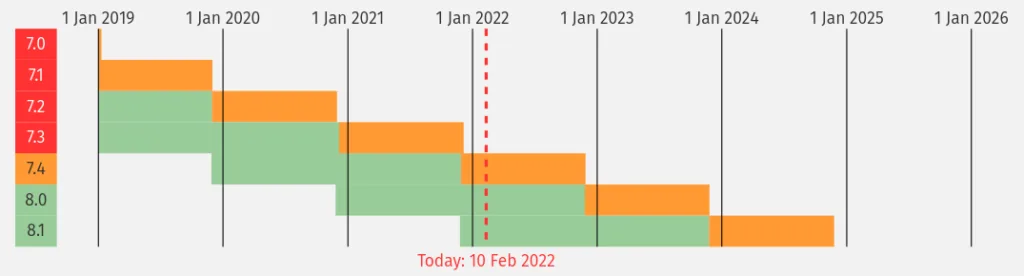
The oldest "acceptable" PHP version is now PHP 7.4. The recommended versions are PHP 8.0 and 8.1.
PHP versions available in Plesk on shared hosting
On our shared hosting plans, obsolete PHP versions, i.e. PHP 7.3 and earlier, can no longer be selected from your Plesk control panel. If you are using one of these versions, it will keep working, but if you switch to a more recent version, you will no longer be able to select an obsolete version yourself.
To prevent our shared hosting customers from unintentionally using an obsolete PHP version, we will gradually "push" more recent PHP versions: we will switch all websites using an obsolete PHP version to PHP 7.4. In the following months, we will do the same again, this time to move to PHP 8.1.
We will contact you before making this change.
In the meantime, please make sure your websites are compatible by updating them, or get ahead of the change by manually selecting an up-to-date PHP version.
Remember that keeping your scripts up to date is a basic security prerequisite, essential to keeping your websites secure.
If needed, you can contact HaiSoft technical support to ask for a version that can no longer be selected to be re-enabled on your website.
Reminder: choosing your PHP version
In your Plesk control panel (in French), under the relevant domain, click "PHP Settings":
In the "PHP support" drop-down menu, select the version you want.

At the very bottom of the page, confirm by clicking OK.

Wait 10 to 15 seconds and try visiting your website. Check that it is working properly using the logs available in Plesk (in French).