Plesk dedicated servers: should you enable automatic updates?
If you have a virtual or dedicated server, you may have noticed that Plesk offers to update the server's various software components. What are the advantages and drawbacks of automatic updates? Here is the view of your managed services provider.
Managed services and updates
HaiSoft's managed services, included with every dedicated or virtual server, cover on-demand updates (with a simple support ticket) of all the server's software components, i.e. the system packages and Plesk. Our technical team then checks that the update has gone smoothly and immediately fixes any problem.
Critical security updates, for their part, are applied proactively by HaiSoft as soon as a vulnerability becomes known.
However, the latest updates, even minor ones, bring significant security improvements, such as new encryption protocols, new PHP versions or new versions of the web application firewall. All of this gives your sites better protection. It is therefore still advisable to update your server's software frequently, even if you don't need the new features.
What's more, for some years now Plesk has been offering and recommending automatic updates more and more. It is even promoted on the home screen. But should you give in to the temptation to enable this feature?
Advantages and drawbacks of automatic updates
To clarify the various factors involved, here is a table summarising what we consider to be the important implications of automatic updates:
| Advantages | Drawbacks |
| Maximum level of security | Reduced reliability if the update fails or alters the configuration in a problematic way |
| Frequent bug fixes | Risk of running into a new bug |
| New features as soon as they are released | No manual check that the update has gone smoothly |
| No need to remember to request a server update | Risk of forgetting major updates that are not automatic, or an upgrade to a newer OS if the current one is obsolete. |
This table shows that whether or not to enable automatic updates broadly depends on how you weigh your security requirements against your stability requirements.
That leaves two main scenarios:
- If security comes before everything else, enable automatic updates
- If reliability comes before everything else, request updates from the HaiSoft managed services team at least once every 1 to 6 months.
A few further considerations
Some of our customers use automatic updates, and so far we have not seen any major problems. We have noted a few failed updates, but they did not affect the server's operation, so we were able to fix them and run them manually to get everything back in order. Nevertheless, we prefer to warn you of the theoretical risk involved.
Please note that if your server has not received a major update for more than 3 months, it is strongly recommended that you ask our managed services team for a manual update before enabling automatic updates.
Enabling or disabling Plesk automatic updates
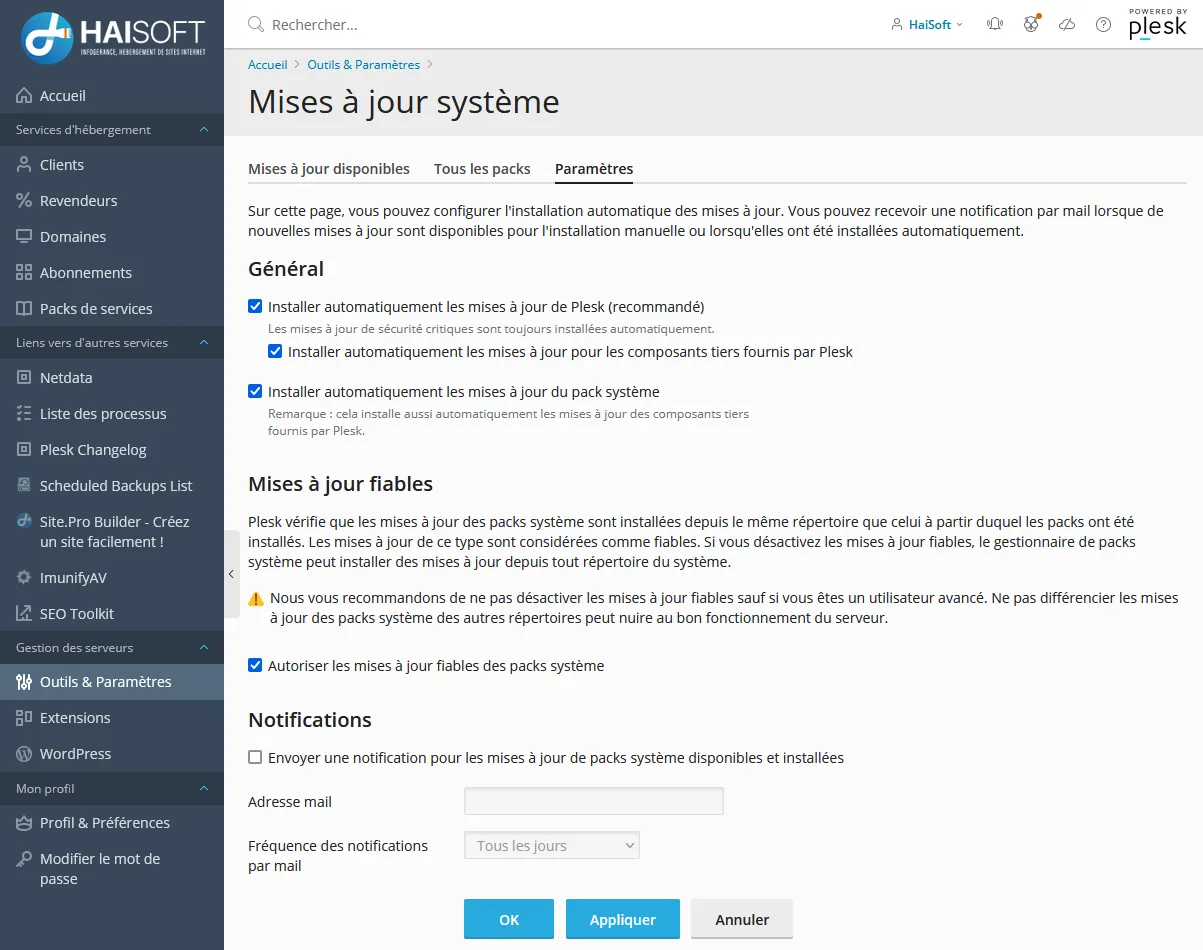
To check your setting and enable or disable automatic updates, go to "Tools & Settings" and then "Update Settings", where you will find the following screen:
Don't have a HaiSoft server yet? Call us on 0115 871 7533 or use our contact form.