PHP 5.6 end of life on 1 January 2019
…PHP 7.0 already at end of life and PHP 7.3 ready for launch!
PHP is by far the most widely used programming language for today's websites: WordPress, Joomla, Prestashop, Drupal, SPIP, Nextcloud and many more. What many people don't realise, however, is that PHP refers not only to the programming language but also to the PHP interpreter, which executes the code and without which the language would be useless. This interpreter, and by extension the language, evolves over time through what are known as "PHP versions".

The oldest version currently still supported by the PHP project is PHP 5.6. Although active support already ended on 19 January 2017, extended security support for PHP 5.6 will end on 31 December 2018. This period had been extended because PHP 5.6 was the last release of the PHP 5 branch.
Support for PHP 7.0 has already ended! You therefore need to move to PHP 7.1 or later!
The full, official schedule of PHP versions is available here.
I use PHP 7.0, 5.6 or earlier: what should I do?
If you use a CMS (such as WordPress) and it is up to date, along with its themes and plugins, there is a good chance that your site already supports PHP 7.1 and later without any problems. If not, it is time to update it or to switch to a more recent CMS!
You can select a higher PHP version right now from your Plesk control panel (guide in French)!
The recommended procedure is simple:
– Choose the latest PHP version (in French)
– Visit your site and make sure it works properly
– Also check your logs in Plesk (in French) to make sure no errors are being generated
– If everything works as it should, you're done
– If it doesn't work and the logs don't help you identify the cause of the problem (an outdated plugin, for example), repeat the operation with the previous PHP version.
Why change it if it works?
A typical old-school remark
If there is one field where it is unwise to resist change, it is the web! PHP is a dynamic language in every sense of the word. There are many reasons why it evolves, including:
- Simpler development. Some inelegant or impractical functions, some syntaxes and some conventions are removed or changed over time to better serve PHP developers. Like a spoken language, PHP moves with the times and evolves with every version.
- Security. Because PHP is a dynamic language, it can execute queries and commands from outside, which sometimes means it can execute requests that are dangerous for your site. These PHP "functions" are then flagged as deprecated in the site's logs, and disabled in the following PHP version in favour of other, more secure functions. Updating PHP therefore means better security.
- Better performance. PHP is one of the few pieces of software that gets more optimised over time. Some inefficient functions are gradually removed, and the very core of PHP can be reworked to optimise how it runs. As a result, PHP 7 executes code up to 3x faster than PHP 5.6.
Obsolete PHP versions: update campaign
At HaiSoft, unlike some other hosting providers, everyone can choose their own PHP version. However, some sites are not maintained, and some people are simply not used to having access to this setting. As a result, some customers use an obsolete version of PHP even though their CMS is often compatible with a more recent one.
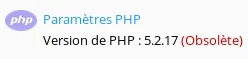
As a reminder, PHP 5.4 has been obsolete since 2015, PHP 5.3 since 2014 and PHP 5.2 since 2011. If you are using one of these versions, your site's security is far from optimal.
To raise general awareness of the importance of the PHP version and to further improve our customers' security and performance, we have planned a major PHP version update campaign. After notifying all the customers concerned, all sites on our shared hosting servers will gradually be moved to PHP 7.1 or later. In case of incompatibility, it will be possible to switch back to an earlier version (via your Plesk control panel or by asking our support team). For all compatible sites, this will be a big step forward.
Moving to PHP 5.6 and later: a notable change for e-mailing
PHP 5.6 and later now check that the SMTP server (used to send e-mails) has a valid encryption certificate. However, the server is usually set to "localhost" or "127.0.0.1", and a certificate cannot be valid for these names.

For SMTP sending, you therefore need either to use a PHP directive that ignores the certificate, or to use your HaiSoft server's name as the host name. For example, if you are on server srv01, replace "localhost" with: srv01.haisoft.net
PHP 7.3 ready for launch
At the time of writing, PHP 7.3 has just been released as a stable version.
Plesk 17.8 already supports it, but Plesk 17.5 does not yet allow it to be installed. We have therefore updated our shared hosting servers slightly ahead of schedule so that you can benefit from PHP 7.3.
What to expect as a HaiSoft customer:
- Our dedicated server and VM customers already on Plesk 17.8 can ask us to install PHP 7.3 with a simple support ticket; otherwise, we will install it during your server's next update.
- Our VM/dedicated server customers on Plesk 17.5 are welcome to request a Plesk update by support ticket: the procedure is part of your managed services, so it is free of charge.
- All shared hosting servers have been updated to Plesk 17.8 and PHP 7.3 has been installed.
And you, which PHP version are you using?