Amazonbot: when Amazon's crawler brings your server to its knees
On the servers we manage, Amazonbot keeps showing up in our traffic analyses, alongside other AI crawlers such as GPTBot or meta-externalagent. This is not a stance against AI on principle: we have seen it during several load incidents where Amazon's crawler topped the logs, on websites that have never gained anything from it.
This article explains what Amazonbot does, why it weighs so heavily on online shops, how to spot it in your logs and what options you have to slow it down or block it.
What exactly is Amazonbot?
Amazonbot is Amazon's general-purpose web crawler: according to its official page, it is used to improve the company's products and services and may be used to train its AI models. Originally presented as the crawler that feeds Alexa, it is now clearly a collector of training data.
Amazon now distinguishes three agents, each of which can be configured separately in robots.txt:
| Agent | Stated purpose | AI training | Honours robots.txt |
|---|---|---|---|
| Amazonbot | Improving products and services | Yes, possibly | Yes |
| Amzn-SearchBot | Search experiences (Alexa, etc.) | No | Yes; without a dedicated rule, it follows the rules given to other search engines |
| Amzn-User | Live retrieval to answer a user | No | Not always, as the action is triggered by a human |
The user agent looks like an ordinary Chrome followed by compatible; Amazonbot/0.1. Amazon publishes the IP addresses of each agent, which makes it possible to tell the real crawler from an impostor.
One detail matters a lot to a hosting provider: Amazonbot does not support the Crawl-delay directive. So you simply cannot ask it to slow down. It does, however, honour Disallow, rel=nofollow and the noindex and noarchive meta tags, the latter meaning "do not use the page for training" at Amazon. Any change to robots.txt can take about 24 hours to be taken into account, and the crawler may rely on a cached copy up to 30 days old.
The problems observed
The main complaint about Amazonbot is not that it exists, but that it arrives in waves, without warning and without restraint. We are not the only ones to have noticed.
| Who | When | What happened |
|---|---|---|
| Xe Iaso, developer | January 2025 | Her self-hosted Git server becomes unstable under traffic attributed to Amazon; she ends up writing Anubis, a proof-of-work anti-bot filter (Ars Technica) |
| git.gmem.ca | June 2024 | About 25,000 Amazonbot requests blocked in less than 24 hours on a small Git forge |
| Hypernode, e-commerce host | May 2023 | Several online shop servers where more than 10% of the computing power went to Amazonbot; traffic varied widely from one week to the next |
| Discourse forum | 2021 | 39,649 Amazonbot requests against 457 for the next visitor; around ten AWS IPs each sending more than 1,000 requests in a day; the author eventually suspects an impostor |
These cases have one thing in common: the crawler goes after the pages that are most expensive to generate. On a Git forge, that means commit history and blame views. On a WooCommerce or PrestaShop shop, it means faceted filters: every combination of colour, size, price and brand generates a separate URL, and therefore a practically infinite number of pages.
A crawler that follows every link with no rate limit then explores thousands of combinations that nobody will ever look at. Each one bypasses the page cache, since the URL is unique, and triggers a PHP request and several SQL queries.
A real case: Amazonbot trapped by JetBlog pagination
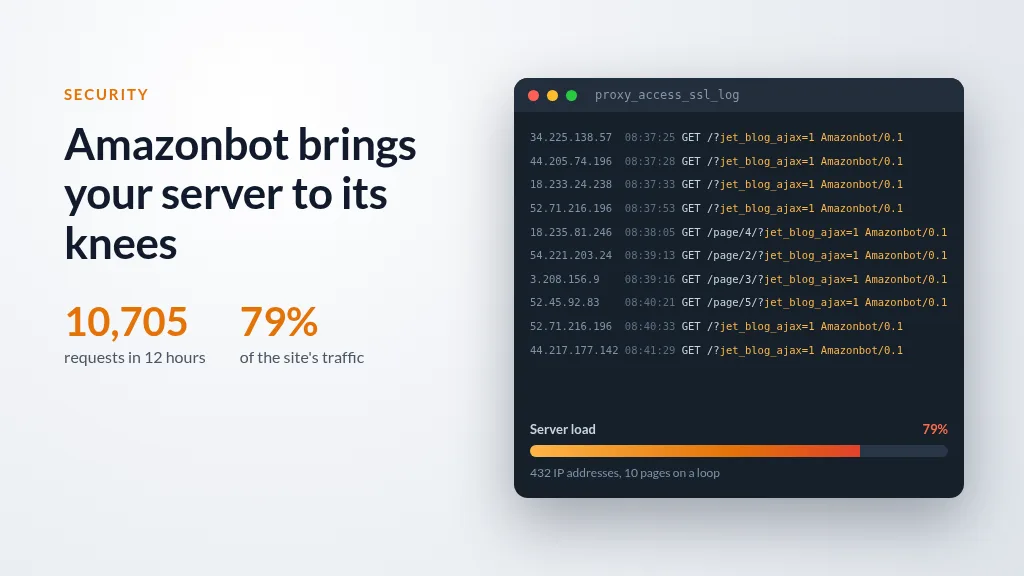
In early October 2026, on a WordPress site we host, Amazonbot went round in circles on a blog's pagination. Over 12 hours on 5 October, it sent 10,705 requests from 432 IP addresses, i.e. 79% of all the site's traffic. The merry-go-round continued the next day; here is a short extract from the access log of 6 October (the site is not shown and the user agent is abbreviated):
34.225.138.57  [06/Oct/2026:08:37:25] "GET /?jet_blog_ajax=1&nocache=1791224346&s"        200 32057 "-" "…Amazonbot/0.1…"
44.205.74.196  [06/Oct/2026:08:37:28] "GET /?jet_blog_ajax=1&nocache=1791228922&s"        200 32057 "-" "…Amazonbot/0.1…"
18.233.24.238  [06/Oct/2026:08:37:33] "GET /?jet_blog_ajax=1&nocache=1791120571&s"        200 32056 "-" "…Amazonbot/0.1…"
52.71.216.196  [06/Oct/2026:08:37:53] "GET /?jet_blog_ajax=1&nocache=1791224758&s"        200 32057 "-" "…Amazonbot/0.1…"
18.235.81.246  [06/Oct/2026:08:38:05] "GET /page/4/?jet_blog_ajax=1&nocache=1791241950&s" 200 31720 "-" "…Amazonbot/0.1…"
54.221.203.24  [06/Oct/2026:08:39:13] "GET /page/2/?jet_blog_ajax=1&nocache=1791241202&s" 200 31618 "-" "…Amazonbot/0.1…"
3.208.156.9    [06/Oct/2026:08:39:16] "GET /page/3/?jet_blog_ajax=1&nocache=1791240922&s" 200 31948 "-" "…Amazonbot/0.1…"
52.45.92.83    [06/Oct/2026:08:40:21] "GET /page/5/?jet_blog_ajax=1&nocache=1791241462&s" 200 30055 "-" "…Amazonbot/0.1…"
52.71.216.196  [06/Oct/2026:08:40:33] "GET /?jet_blog_ajax=1&nocache=1791213591&s"        200 32056 "-" "…Amazonbot/0.1…"
44.217.177.142 [06/Oct/2026:08:41:29] "GET /?jet_blog_ajax=1&nocache=1791126368&s" 200 32057 "-" "…Amazonbot/0.1…"Mozilla/5.0 AppleWebKit/537.36 (KHTML, like Gecko; compatible; Amazonbot/0.1; +https://developer.amazon.com/support/amazonbot) Chrome/119.0.6045.214 Safari/537.36| Measurement (5 October, 08:00 to 20:00) | Value |
|---|---|
| Amazonbot requests | 10,705, i.e. one every 4 seconds on average |
| Share of the site's total traffic | 79% (10,705 requests out of 13,611) |
| Of which JetBlog pagination | 100% |
| Regularity | Between 887 and 896 requests every hour, at most 16 in a minute |
| Distinct IP addresses | 432; the most active one sent only 52 requests in 12 hours |
| Actually different pages | 10: the home page and pages 2 to 5 of the blog, the References page and its pages 2 to 4, one presentation page |
| Responses | 100% HTTP 200 |
| Volume served | 323.6 MB, i.e. about 30 KB per request |
| 24-hour projection at this rate | About 21,000 requests and 650 MB |
| IPs checked against the official Amazonbot list | 58 out of 58 in the extract of 6 October (list of 8 September 2026) |
What this extract shows
It really is Amazonbot, not an impostor. All the IPs in the extract appear in the list published by Amazon. The official crawler of a multinational can therefore produce this kind of traffic on its own.
The crawler fell into an infinite URL trap. The JetBlog module (Crocoblock suite for Elementor) loads its pagination via AJAX. Its links carry jet_blog_ajax=1 and a nocache parameter that changes every time the page is displayed. To a crawler, each value is a new page: it endlessly requests the same ten pages under different names, with metronome-like regularity. The nocache values actually look like timestamps from previous days, a sign that the crawler is replaying links collected on earlier visits.
The cache is useless. Since every URL is unique, no response is served from the cache: all 10,705 requests over the 12 hours were computed by PHP and MySQL, only to return the same ten pages over and over.
Blocking by IP is pointless. With 432 addresses in 12 hours, the most active IP sent only 52 requests, barely more than 4 per hour. Fail2ban or a per-IP rate limit sees nothing abnormal; only the signature of the request, its user agent or the shape of its URL, makes it possible to react.
What we put in place
Rather than blocking Amazonbot, we dealt with the cause: a rule in the web application firewall defuses this trap for all crawlers. A JetBlog pagination request sent without the AJAX header X-Requested-With, which no browser does, is redirected with a 301 to the clean URL. The crawler then lands on a single address, served from the cache.
Why it is so costly for a hosting provider
On a shared server, a crawler running wild on one site slows down all the others. PHP processes, MySQL connections and memory are shared: a few thousand faceted pages generated in an hour are enough to lengthen the response times of dozens of sites that asked for nothing.
Three factors make Amazonbot's case worse:
- No
Crawl-delay. The only standard setting for asking a crawler to slow down is ignored. All that remains is an outright ban, partial or total. - Dynamic pages only. A crawler downloads no images, CSS or JavaScript; it only requests HTML, which is the most expensive part to produce.
- Nothing in return. Unlike Googlebot or Bingbot, Amazonbot brings no measurable visitors to a typical European online shop. The server cost is real, the benefit remains hypothetical.
It is this imbalance, more than the raw volume, that justifies treating it separately from conventional search engines.
Spotting it in your logs
Amazonbot honestly identifies itself through its user agent: a simple search for the word Amazonbot in the access logs is enough for a first measurement. On a Plesk server, the logs are in /var/www/vhosts/system/<domain>/logs/; if nginx acts as a proxy in front of Apache, read the proxy_access* files.
The sites most visited by Amazonbot:
for d in /var/www/vhosts/system/*/; do
  n=$(cat "$d"logs/*access_ssl_log 2>/dev/null | grep -c Amazonbot)
  [ "$n" -gt 0 ] && echo "$n $(basename "$d")"
done | sort -rn | head
The hour-by-hour rate on one site, to spot the waves:
grep Amazonbot /var/www/vhosts/system/example.com/logs/proxy_access_ssl_log \
  | awk '{print substr($4, 2, 14) "h"}' | uniq -c | tail -24
Real crawler or impostor?
Anyone can write "Amazonbot" in a user agent, and many malicious bots run on rented AWS servers, and therefore with IPs belonging to Amazon. An "Amazon" IP proves nothing: the 2021 Discourse case came from EC2 IPs and its author concluded it was an impostor.
Two reliable checks:
- Compare the IP with the list published by Amazon.
- Run a reverse DNS lookup: the real crawler answers with a name ending in
crawl.amazonbot.amazon, which you then confirm with a forward lookup.
host <suspicious IP>        # must return ...crawl.amazonbot.amazon
host <returned name>        # must return the same IP
This distinction matters: an impostor ignores robots.txt, and only server-side blocking will stop it.
Countermeasures, from the gentlest to the firmest
1. robots.txt, site by site
This is the courteous method, and Amazon commits to honouring it for Amazonbot. It only protects against the real crawler and takes up to 24 hours to apply.
Disallow the whole site:
User-agent: Amazonbot
Disallow: /
Or only the facets, leaving product pages accessible:
User-agent: Amazonbot
Disallow: /*?*filter_
Disallow: /*?*pa_
Disallow: /*?*min_price=
Disallow: /*?*q=
To refuse the use of your content for training without blocking crawling, Amazon also recognises the <meta name="robots" content="noarchive"> tag.
2. ModSecurity, at server level
robots.txt only applies to crawlers that honour it, and it has to be changed site by site. The ModSecurity web application firewall acts upstream: it rejects a request based on its user agent or the shape of its URL before WordPress or PrestaShop is even called. A request blocked at this stage costs the server almost nothing, and impostors posing as Amazonbot are stopped too.
On a Plesk server, this setting can be applied domain by domain, to protect a specific site without touching the others, or globally for all hosted sites. The right level depends on your sites and their traffic: discuss it with our technical team, who will then check in the logs that the setting has the intended effect.
3. Watch your code: no black holes for crawlers
The JetBlog case shows it: the problem did not come only from the crawler, but from a module that generated URLs endlessly. To a crawler, every new link is a new page to visit. A site that generates them without end becomes a black hole that sucks it in, and every pass is paid for in server resources.
The most common sources of black holes:
- cache-busting or timestamp parameters added to links, such as the
nocachein JetBlog's AJAX pagination; - WooCommerce or PrestaShop faceted filters, whose combinations run into the thousands;
- calendars and archives that let you move forward month after month without end;
- internal search pages reachable through a link, including with an empty search (
?s=).
A few reflexes are often enough: look in your logs at which URLs crawlers actually visit, do not expose addresses meant only for AJAX as regular links, mark these links rel="nofollow", which Amazonbot honours, and disallow their patterns in robots.txt:
User-agent: *
Disallow: /*jet_blog_ajax=
Disallow: /*?*filter_
In our case, since it was the real Amazonbot, the first of these lines would have been enough to make it give up on the JetBlog pagination, within the roughly 24 hours announced by Amazon.
Block it or not?
Blocking Amazonbot has no effect on Google or Bing rankings, which makes it a low-risk decision for most sites. There are nonetheless arguments on both sides.
| Block | Let it through |
|---|---|
| Lower server load, especially on shops with faceted navigation | Possible visibility in answers from Alexa and Amazon's AI services |
| Content not reused to train models | Amazon Content Partners programme: a small affiliate commission bonus and hosting credits for sites that allow it |
| No measurable loss of traffic for a typical European site | Blocking by user agent does not stop impostors, which require other defences anyway |
For an Amazon affiliate site or a media outlet targeting voice search, a partial block, limited to facets and search pages, is a good compromise. For a shop hosted on a shared server, a complete block remains the simplest choice.
In short
Amazonbot is not a hacker: it announces itself, publishes its IPs and honours robots.txt. But it does not know how to slow down, it targets the most expensive pages and brings almost nothing to the sites it visits. First measure its share in your logs, check that it really is Amazonbot, then choose between a targeted robots.txt and server-side blocking. And whatever you choose, protect your facets: the next crawler may not be so polite.
At HaiSoft, we monitor the traffic of the sites we host and of the servers we manage. Is a crawler weighing on your site, or are you unsure which countermeasure to choose? Contact our technical team.
Sources
- Amazon Developer: About Amazonbot
- Amazon Developer: Amazonbot IP addresses
- Xe Iaso: Amazon's AI crawler is making my git server unstable
- Ars Technica, via Harvard TagTeam: Devs say AI crawlers dominate traffic
- Hypernode: How Amazon's web crawler could impact the performance of your online store
- Discourse Meta: Amazonbot abusive crawling
- SegmentFault: summary of the git.gmem.ca post